
If you are looking for the Broken Keyboard Grok Answer, the key is not just knowing which symbols represent which letters. The Grok Academy Module 4.3 challenge tests whether you understand how Python string replacement works when patterns overlap. In this exercise, %% becomes a, ### becomes o, and ## becomes e. The replacements must be applied in the right sequence or the final text will be incorrect.
The most important detail is to replace the longer hash pattern before the shorter one. Python processes each replace() call immediately, so changing ## first can damage every ### sequence before Python gets a chance to convert it properly. The solution below shows the correct code, explains why the order matters, and gives you a simple way to understand the logic rather than copying the answer without learning from it.
Broken Keyboard Grok Answer: Correct Python Code
The Broken Keyboard Grok Answer for this version of Module 4.3 uses three replace() calls after collecting the user’s sentence with input(). Each call fixes one broken keyboard symbol. The final print() statement then displays the corrected message with the required wording. Because the code modifies the same text variable each time, every replacement affects the version produced by the line immediately before it.
text = input('What did she say? ')
text = text.replace('%%', 'a')
text = text.replace('###', 'o')
text = text.replace('##', 'e')
print('She meant to say: ' + text)
The code is short, but every character matters. %% must be converted to a, ### must be converted to o, and ## must be converted to e. Notice that the triple-hash replacement comes before the double-hash replacement. That ordering prevents partial matches from corrupting the original symbol pattern. If your code matches this structure exactly, it should produce the intended corrected sentence for the challenge inputs.
| Broken symbol | Correct letter | Replacement |
|---|---|---|
%% | a | text.replace('%%', 'a') |
### | o | text.replace('###', 'o') |
## | e | text.replace('##', 'e') |
Why the Replacement Order Matters
The replacement order matters because ### contains ## inside it. If Python sees the double-hash rule first, it can match the first two characters of a three-hash sequence. That converts part of ### into e and leaves one # behind. Once that happens, the original triple-hash pattern no longer exists, so the later replace('###', 'o') call cannot repair it properly.
A useful programming rule is to handle longer or more specific overlapping patterns before shorter ones. In the Broken Keyboard Grok Answer, ### is the more specific pattern because it has three characters, while ## has only two. Replacing the longer pattern first preserves the intended meaning. This idea appears in many programming tasks involving text cleanup, parsing, search-and-replace rules, and data transformation, so it is worth remembering beyond this exercise.
For example, this order is correct:
text = text.replace('###', 'o')
text = text.replace('##', 'e')
This order is wrong:
text = text.replace('##', 'e')
text = text.replace('###', 'o')
How the Broken Keyboard Code Works
The first line asks the user what the speaker said and stores that input in the variable text. The next line searches the string for every occurrence of %% and replaces each one with the letter a. Python strings are immutable, which means replace() returns a new string rather than editing the old one in place. Assigning the result back to text keeps the corrected version for the next step.
The next two lines repair the hash-based symbols. Python first changes every ### into o, then changes the remaining ## sequences into e. Finally, the program joins the label She meant to say: with the corrected text and prints the result. This sequence is easy to read and matches the learning objective: using string methods, assignment, and careful operation order to transform user input into clean output.
The process can be understood in five simple steps:
- Ask the user to enter the broken sentence.
- Store the input in the
textvariable. - Replace every
%%witha. - Replace
###withobefore replacing##withe. - Print the corrected sentence.
The important Python method is:
string.replace(old, new)It searches for the specified old text and returns a new string containing the replacement.
Common Broken Keyboard Mistakes to Avoid
The most common mistake is swapping the two hash replacements. A student may see ## first and write that line before the ### rule, but the shorter pattern can consume part of the longer one. Another mistake is forgetting to assign the result of replace() back to text. Calling text.replace(...) by itself does not update the variable, because the method returns a new string instead of modifying the original string.
Syntax details can also cause a failed result. Make sure the symbols are inside quotes, the replacement letters are lowercase, and the parentheses are balanced. The output label should also match the exercise instructions. If your program runs without an error but gives the wrong sentence, check the replacement order first. If it throws a syntax error, inspect quotation marks, commas, parentheses, and indentation before changing the overall logic.
Common errors include:
- Replacing
##before### - Forgetting quotation marks around symbols
- Using the wrong replacement letter
- Forgetting
text =beforetext.replace() - Misspelling
replace - Changing the required output message
- Leaving out one of the three replacements
For example, this does not save the replacement:
text.replace('%%', 'a')Instead, use:
text = text.replace('%%', 'a')Correct vs. Incorrect Replacement Order
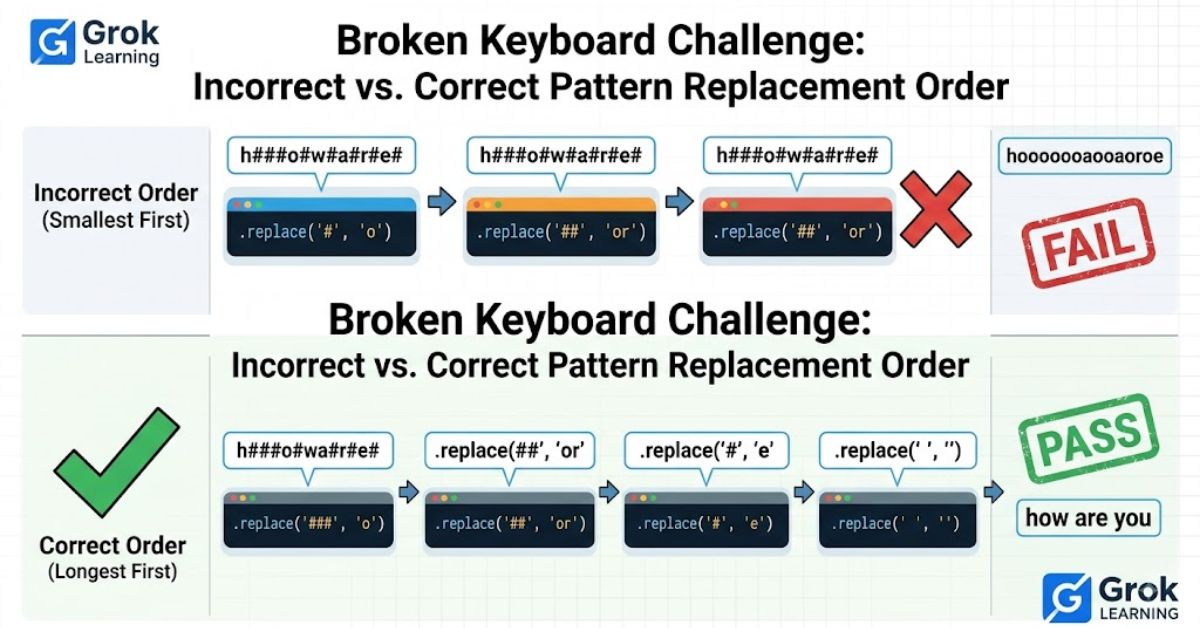
An example makes the overlap easier to see. Suppose a sentence contains ### where the letter o should appear. With the correct order, Python finds all three hashes together and replaces them with o. With the wrong order, Python may replace the first two hashes with e, leaving a single #. The damaged text can no longer match the triple-hash rule, so the final output remains incorrect.
The table below compares the two approaches. The correct sequence protects the longer pattern and produces clean output. The incorrect sequence changes part of the pattern too early. This is why the Broken Keyboard Grok Answer is really an exercise in understanding pattern priority, not merely memorizing three lines of code. Once you see how overlapping matches behave, the solution becomes much easier to reconstruct on your own.
| Approach | First operation | What happens to ### | Result |
| Correct | Replace ### with o | ### becomes o | Correct |
| Incorrect | Replace ## with e | ### can become e# | Incorrect |
Consider the incorrect sequence:
text = '###'
text = text.replace('##', 'e')
The value can become:
e#Now this command has nothing to find:
text = text.replace('###', 'o')The original ### pattern has already been destroyed.
Quick Checklist Before Submitting Your Code
Before submitting, read the program from top to bottom and verify that each replacement matches the symbol-to-letter mapping. Then check that ### appears before ##. This single detail is responsible for most confusion in the challenge. You should also confirm that each replace() result is assigned back to text and that the final print statement combines the prompt text with the corrected string exactly as required.
If you want to test your understanding, create a few short inputs containing each broken symbol separately and then mix the symbols together. Predict the corrected sentence before running the program. This small habit turns the Broken Keyboard Grok Answer into a useful Python lesson instead of a one-time solution. Testing simple cases is also a practical debugging technique you can reuse when working with strings, conditions, loops, and other beginner programming exercises.
Use this checklist before submitting:
- The program asks for input using
input(). - The input is stored in
text. %%is replaced witha.###is replaced witho.###is processed before##.##is replaced withe.- Every replacement is assigned back to
text. - The final corrected message is printed.
- There are no missing quotation marks or parentheses.
Conclusion
The Broken Keyboard Grok Answer is straightforward once you understand the replacement priority. Use %% for a, replace ### with o, replace ## with e, and keep the triple-hash rule before the double-hash rule. That order prevents Python from breaking a longer symbol pattern into an unintended partial match. The rest of the program simply stores the input, updates the string, and prints the corrected message.
More importantly, the challenge teaches a general coding principle: when text patterns overlap, process the more specific pattern first. Remembering that idea will help you solve similar string-manipulation problems without relying on memorized answers. If your result does not match the expected output, compare your code line by line, check the hash replacement sequence, and verify that every replace() call is saved back into the text variable.