
Hammer AI is a privacy-focused AI platform built for character chat, roleplay, story writing, and image creation. Its main differentiator is local AI: on supported desktop systems, users can run large language models on their own hardware through Ollama instead of sending every conversation to a remote server. HammerAI also offers web and mobile access, giving users a choice between local processing and cloud-hosted models depending on device capabilities.
That flexibility makes the service especially interesting for people who want creative AI tools without being locked into one model or one workflow. HammerAI supports community characters, custom personas, group chats, lorebooks, text-to-speech, image generation, and external model connections. However, privacy depends on which features you use. Local desktop chat can stay on-device, while cloud models, syncing, and standard image generation involve remote services and should be treated differently.
What Is Hammer AI?
HammerAI is best understood as a creative AI environment rather than a general-purpose productivity chatbot. The platform is designed around interactive characters, long-form roleplay, fictional worlds, and collaborative storytelling. Users can browse community-made characters or build their own with custom personalities, backstories, behavioral rules, and speaking styles. The same environment can be used to write stories, generate supporting images, and create personas that shape how characters respond to the user.
The platform also gives users more control over the underlying AI than many conventional chat apps. HammerAI supports multiple open-source language models and lets users adjust settings such as temperature, context length, and system prompts. It also includes proxy support for external model services, so advanced users are not limited to bundled choices. This flexibility is useful when one model works better for dialogue, another for fiction, and another for structured writing.
Some of its major creative uses include:
- AI character chat and roleplay
- Interactive fiction and story writing
- Custom character creation
- User personas
- Group character conversations
- Lorebooks for world-building
- AI-generated images
- Text-to-speech and character voices
- Local and external LLM experimentation
How Hammer AI Works
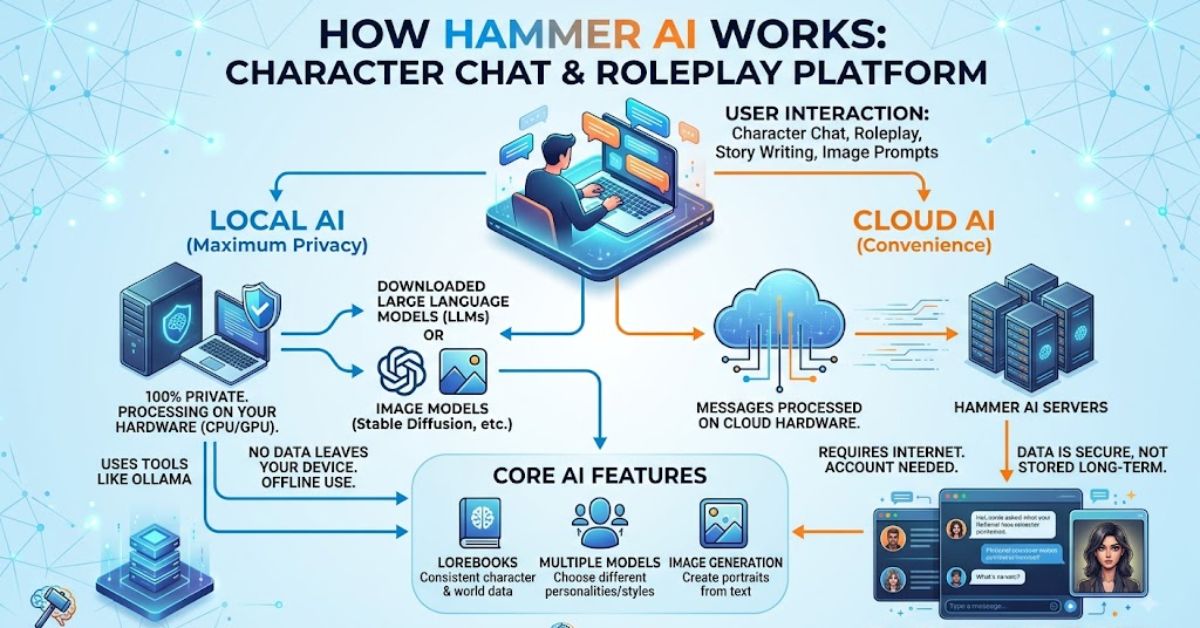
On desktop, HammerAI can run language models locally using Ollama, which handles model deployment and can use compatible Nvidia, AMD, Intel, or Apple graphics hardware when available. If the selected model is too large for the available GPU memory, performance may fall back toward CPU processing and become slower. The practical result is that local AI quality and speed depend heavily on the model size, available RAM, VRAM, and the computer running it.
HammerAI also supports local inference in the web app through WebLLM when the browser and hardware support WebGPU. Users who do not have suitable hardware can use cloud-hosted models instead, and mobile users can access HammerAI through dedicated iOS and Android apps. This mixed architecture is important: “private” does not automatically mean every feature is offline. Users should choose local inference when privacy is the priority and cloud processing when convenience or model capability matters more.
A typical local desktop workflow looks like this:
- Install the HammerAI desktop application.
- Select or download a supported language model through its Ollama integration.
- Choose or create an AI character.
- Confirm that a local model is selected rather than a cloud service.
- Start chatting, roleplaying, or writing with inference running on your computer.
For better local performance, users should pay attention to:
- Available system RAM
- GPU VRAM
- Model parameter size
- Context-window settings
- Other programs consuming GPU memory
Key Features of Hammer AI
The strongest Hammer AI features revolve around creative continuity. Group chats allow several characters to participate in one conversation while maintaining separate personalities. Lorebooks let writers define world history, rules, locations, and recurring facts so longer stories stay more consistent. Personas work from the other direction by defining who the user is inside a roleplay. Together, these tools make the platform more structured than a simple prompt-and-response chatbot for ongoing fictional worlds.
HammerAI also includes image generation and text-to-speech. Its current mobile listing advertises dozens of AI art models, including Flux and Stable Diffusion options, along with more than 300 AI voices in multiple languages. The official image-generation documentation says the standard integrated image feature currently uses cloud generation, while separate documentation explains how advanced desktop users can connect local tools such as ComfyUI. That distinction matters for anyone choosing HammerAI primarily because of offline privacy.
| Feature | What It Does | Useful For |
|---|---|---|
| Character Chat | Conversations with custom or community AI characters | Roleplay and entertainment |
| Group Chats | Places multiple AI characters in one conversation | Multi-character scenes |
| Personas | Defines the user’s identity and attributes | Consistent roleplay |
| Lorebooks | Stores fictional-world rules and information | Long stories and world-building |
| Story Tools | Helps users co-write interactive narratives | Fiction writing |
| Image Generation | Creates portraits, scenes, and illustrations | Character and story artwork |
| Text-to-Speech | Gives characters AI-generated voices | More immersive conversations |
| Proxy Models | Connects external compatible LLM services | Advanced model selection |
A particularly useful combination for writers is a custom character plus a persona and lorebook. The character defines who the AI is, the persona tells the AI who the user represents, and the lorebook supplies facts about the fictional world. This structure can reduce contradictions during longer roleplay sessions.
Hammer AI Privacy: What Stays on Your Device?
Hammer AI is most compelling when used in its genuinely local modes. The official documentation says desktop LLMs can run on the user’s computer through Ollama, while the web app can run supported models locally through WebLLM. In those cases, prompts and generated text do not need to be sent to HammerAI’s cloud servers. The platform also says it stores core user data locally by default and does not require an account for basic use.
Users should still avoid treating the entire ecosystem as automatically offline or anonymous. HammerAI also offers cloud-hosted language models, optional cloud syncing, cloud image generation, and subscription services. Its App Store description promotes no ads and no tracking, while Apple’s privacy disclosure says some data may be collected for analytics, functionality, and marketing. For sensitive writing, the safest approach is to use local inference, local storage, and no optional cloud features.
Before entering private or confidential information, check:
A local LLM is selected.
Cloud syncing is disabled if it is not needed.
The feature being used does not require cloud processing.
You understand whether generated media is processed locally or remotely.
Any external proxy provider has an acceptable privacy policy.
This distinction between local storage and local inference is especially important. Saving a conversation on your device does not necessarily mean the AI model that generated the conversation also ran on that device.
Supported Platforms and Hardware
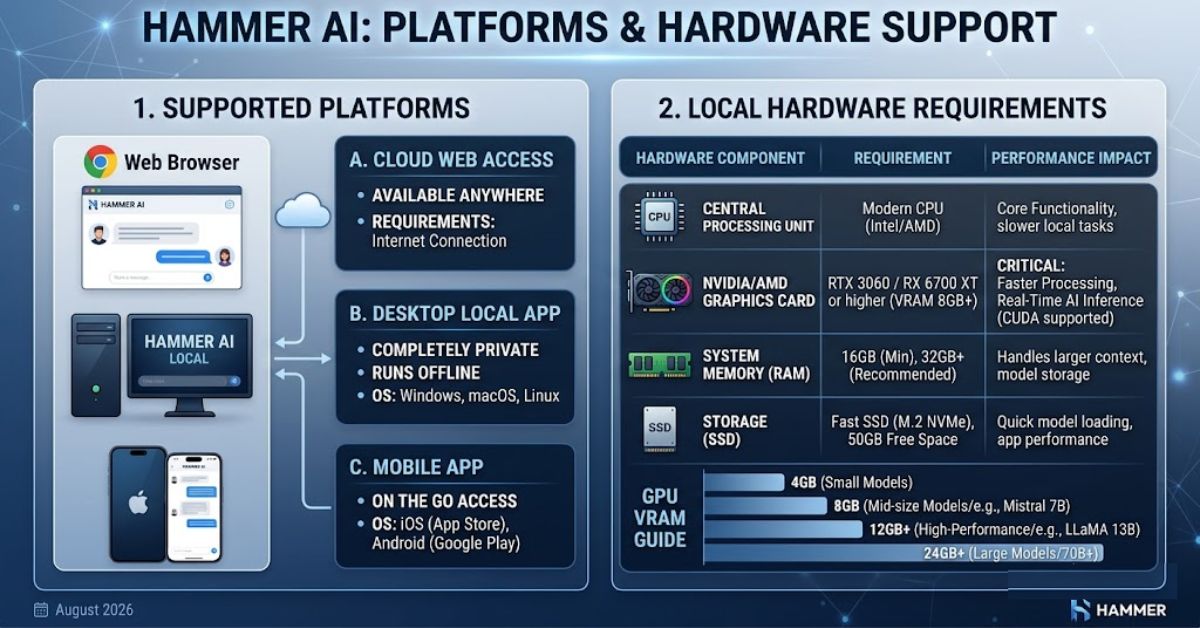
HammerAI is available through the web, desktop apps, and mobile apps. The desktop edition supports Windows, macOS, and multiple Linux package formats, and it is the clearest option for users who want local Ollama-based inference. The web version can run local models in compatible WebGPU browsers or use cloud models when local execution is not practical. Mobile apps focus on convenient character chat, stories, images, voices, and access to the wider HammerAI ecosystem.
Choosing the right version depends on your hardware and privacy goals. A desktop with a capable GPU offers the best path to local model performance and offline use. A modern WebGPU-compatible browser can provide a lighter local option without a full desktop installation. Mobile is the easiest choice for casual use, but users should assume that some advanced model and media features may involve cloud processing unless the app explicitly identifies them as local on the device.
| Platform | Local LLM Option | Best Use |
| Windows Desktop | Yes, through Ollama | Local AI and maximum control |
| macOS Desktop | Yes, through Ollama | Private local character chat |
| Linux Desktop | Yes, through Ollama | Advanced local AI setups |
| Web Browser | Yes, with compatible WebGPU/WebLLM | Convenient browser-based use |
| Android | Cloud/mobile ecosystem features | AI chat on the go |
| iPhone/iPad | Cloud/mobile ecosystem features | Characters, stories, voices, and images |
A powerful GPU is not strictly required for every use case, but hardware affects local model speed substantially. Smaller models generally run on more modest machines, while larger models need more memory and GPU resources.
Hammer AI vs Cloud-Only AI: Who Is It Best For?
Compared with a typical cloud-only AI character platform, Hammer AI gives users more control over where text generation happens and which model produces the response. That is valuable for privacy-conscious users, hobbyists who already run local models, and writers who like experimenting with different LLMs. The tradeoff is complexity: local models consume storage, RAM, and GPU resources, and a weaker computer may produce slower responses than a well-optimized cloud service.
HammerAI also emphasizes creative tooling more heavily than a basic AI chatbot. Character creation, group roleplay, lorebooks, personas, story writing, voice output, and image generation are integrated around the same fictional experience. A cloud-only service may be simpler for someone who only wants fast chat, but HammerAI becomes more attractive when the user wants control, customization, and the option to keep text generation on local hardware instead of depending entirely on a hosted model.
| Factor | HammerAI Local Mode | Typical Cloud-Only AI |
| Text processing | Can run on your device | Runs on provider servers |
| Internet requirement | Can work offline on desktop | Usually required |
| Model choice | Multiple local and external options | Often provider-controlled |
| Hardware demand | Uses your computer resources | Mostly provider-side |
| Setup | May require model downloads | Usually minimal |
| Privacy control | Stronger with local inference | Depends on provider |
| Creative tools | Strong roleplay/story focus | Varies by service |
Hammer AI is particularly suitable for:
- Roleplay enthusiasts
- Fiction and fan-fiction writers
- Character designers
- World-builders
- Privacy-conscious AI users
- People experimenting with open-source LLMs
- Users with capable desktop hardware
It may be less suitable for someone seeking a zero-configuration assistant or expecting every feature to operate completely offline. Local performance depends on hardware, while integrated cloud models, synchronization, and media generation can change the privacy model.
Conclusion
Hammer AI stands out because it combines creative AI features with meaningful control over model choice and local processing. Users can chat with characters, build roleplay worlds, co-write stories, use lorebooks and personas, generate images, and add voices. More importantly, desktop users can run LLMs locally through Ollama, while supported browsers can use WebLLM. Those options make HammerAI more flexible than services that require every prompt to be processed in the cloud.
The key is to understand the boundary between local and cloud features. Local text generation offers the strongest privacy story, while cloud models, syncing, and integrated image generation may send data beyond the device. For users who want customizable AI roleplay and storytelling with an offline-capable path, Hammer AI is worth exploring. Choose the platform and model carefully, match it to your hardware, and verify privacy settings before using sensitive prompts or personal material.